
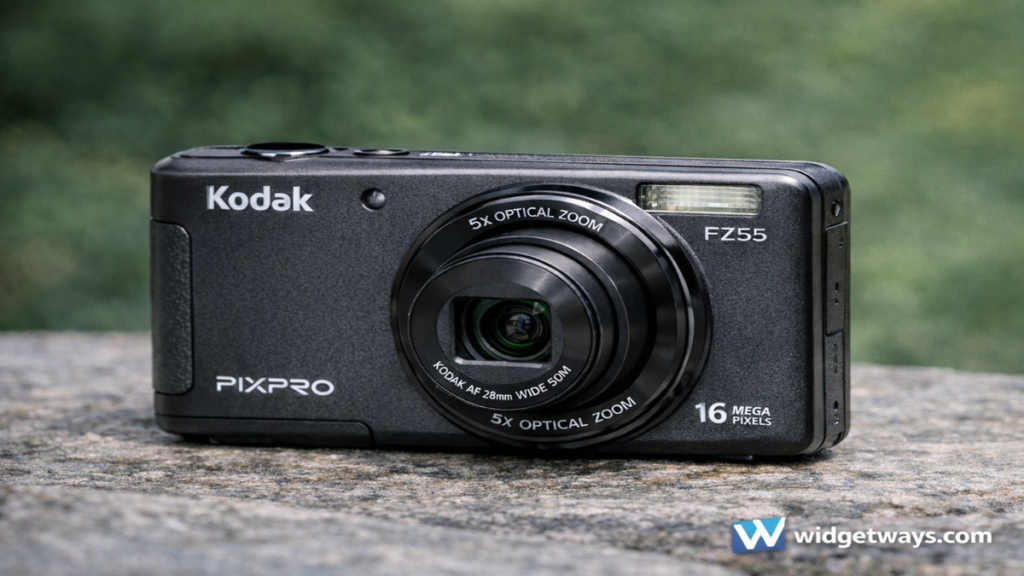

i have a soft spot for cameras that simply get out of the way and let me capture the moment, and that is the best lens through which to understand the Kodak PixPro FZ55. It is not trying to be a professional tool, and it does not pretend to replace a larger interchangeable lens camera. Instead, it focuses on being a small, friendly point and shoot with a useful zoom range, straightforward controls, and an approachable price. In a world where phones do most casual photography, a compact camera like the FZ55 only makes sense when it offers something a phone cannot deliver as comfortably, such as optical zoom reach, a dedicated grip-and-shoot experience, and less distraction while shooting. This article breaks down what the FZ55 is, what it does well, where it feels limited, and how to set it up for better results so you can decide whether it fits your everyday photography style.
What the Kodak PixPro FZ55 Is
The Kodak PixPro FZ55 is a compact digital camera designed for everyday snapshots, travel photos, family events, and casual video clips. Its core promise is simple: put a real zoom lens in your pocket, keep the controls easy, and make it painless to move from wide group shots to tighter framing without relying on digital zoom. People often gravitate toward this class of camera when they want a lighter alternative to bulky gear, or when they want a dedicated device for kids, relatives, or trips where carrying an expensive phone feels risky. The FZ55 fits that mindset because it is small, relatively uncomplicated, and built around automatic shooting with a few helpful scene modes and creative options.
The most important thing to understand is the camera’s “lane.” The FZ55 is best when you let it behave like a modern disposable camera with a zoom lens, meaning you keep expectations realistic about low light, fast action, and cinematic video. If your goal is clean indoor images at night or sharp sports shots across a field, you will want something with a larger sensor, better stabilization, and faster autofocus. If your goal is an inexpensive, pocketable camera that feels more “camera-like” than a phone when you shoot outdoors, around town, on vacation, or in daylight family gatherings, this model starts to make a lot of sense.
Key Specifications at a Glance
Specs matter because they tell you how the camera will behave in the real world. A compact camera’s sensor size, lens range, and stabilization influence image quality far more than marketing terms do. Use the table below as a quick reference for what you are really buying and how each item affects your shooting.
Core Specs Table
| Spec Area | What It Means | Why It Matters in Practice |
|---|---|---|
| Camera Type | Compact point-and-shoot | Prioritizes portability and simple operation |
| Zoom Range | Optical zoom lens (multi-purpose range) | Lets you frame distant subjects without digital zoom artifacts |
| Wide Angle | Useful for groups, travel, interiors | Helps in tight spaces and landscapes |
| Telephoto End | Useful for portraits, details, candid shots | Helps isolate subjects and compress perspective |
| Sensor Class | Small compact-camera sensor class | Great in daylight, more noise in dim light |
| Stabilization | Digital or basic stabilization approach | Helps a bit for shake, but not a miracle in darkness |
| Video | Casual clip-friendly recording | Fine for memories, less ideal for advanced motion work |
| Storage | SD or microSD depending on model variant | Choose reputable cards for reliability |
| Power | Rechargeable battery | Carry a spare for travel days |
This table intentionally stays focused on the lived experience rather than turning into a spec sheet dump. With compact cameras, the numbers only matter when they translate into fewer blurry photos, better color, and more keepers. The FZ55’s overall character leans toward daylight friendliness and travel convenience.
Design, Build, and Portability
When you pick up the FZ55, the first impression is that it is built for pocket carry and quick use. The body stays compact, the lens retracts neatly, and the controls generally favor auto shooting over deep manual adjustment. That design choice is not a flaw. It is the point. A camera like this should be easy to pull out, power on, zoom, and shoot within seconds. If it demands complex settings, it stops being the kind of camera you actually take with you.
In daily handling, small cameras bring both advantages and compromises. The advantage is obvious: you are more likely to carry it. The compromise is stability, because tiny bodies can be harder to hold steady at longer zoom lengths. The best way to work with this is to adopt a simple “compact camera stance.” Tuck your elbows slightly inward, use two hands, and press the shutter gently rather than jabbing it. That one habit alone often doubles your success rate at the telephoto end where tiny shakes become visible blur.
Another real-world design factor is how the camera behaves in a bag. Many people buy a compact camera and then scratch it up by tossing it in with keys, chargers, or coins. If you want it to look decent after a month, use a small pouch or a slim case. This is also where the FZ55 can be a practical travel companion: you can keep it in a jacket pocket or crossbody bag and take it out only when you want a distraction-free photo moment.
Lens and Zoom: The Real Reason to Choose It
The biggest reason to consider a compact camera over a phone is optical zoom. Phones have improved a lot, but many still rely on digital zoom for most distances, and digital zoom is basically cropping and sharpening after the fact. An optical zoom lens, even on an inexpensive compact camera, changes the geometry of your shot. It lets you frame subjects without stepping into the scene, without awkwardly cropping later, and without the exaggerated processing a phone may apply.
The wide end helps you capture architecture, street scenes, group photos, and landscapes with a natural look. The telephoto end helps with portraits that feel less “wide-angle phone” and more flattering, because you can step back and zoom in for a more pleasing perspective. This is one of the easiest upgrades you can make to your casual photography. Stand farther away, zoom in a bit, and the background looks calmer and faces look more natural. It is not just about reaching far. It is about choosing perspective.
That said, zoom introduces two challenges that you should plan for. First, shake becomes more visible as you zoom in, so you need steadier hands or better light. Second, compact zoom lenses often have smaller maximum apertures, which means they gather less light at the long end. The practical result is that zoom works best outdoors, near windows, or in bright rooms. In dim restaurants or nighttime streets, the camera may raise ISO and slow shutter speeds, which can produce noise and blur. If you treat zoom as a daylight superpower, you will be happier.
Image Quality: What to Expect and How to Get Better Results
A camera like the FZ55 can deliver pleasing photos in good light, especially when you keep your expectations aligned with its class. Outdoors in daylight, you can get crisp detail, natural colors, and that satisfying “real camera” look where your framing choices do the heavy lifting instead of aggressive phone processing. Skin tones can look more neutral, and the zoom lens lets you compose more thoughtfully.
In mixed indoor light, you will likely notice the typical compact camera behaviors. Shadows can show grain, fine details can look softer, and bright areas like lamps or windows can clip if exposure is not managed. This is not a dealbreaker if you learn a few habits that help compact cameras shine. One habit is to prioritize light direction. Place your subject near a window or in open shade outdoors, and your photos instantly look cleaner. Another habit is to avoid heavy zoom indoors unless you have strong light, because the long end demands more stability and often pushes the camera into noisier settings.
The good news is that you can influence the camera’s results without needing full manual mode. Exposure compensation is a powerful tool if the camera offers it. If your subject looks too dark against a bright background, bump exposure up slightly. If a bright sky looks blown out, pull exposure down a bit. Even small adjustments can protect highlights and improve color. If exposure compensation is not available or is limited, you can still “cheat” by changing your angle. Step so the bright background is not directly behind your subject, and the camera’s meter will behave better.
Practical Lighting Guide
| Situation | What Usually Goes Wrong | What to Do Instead |
|---|---|---|
| Bright sky behind a person | Face becomes too dark | Turn them toward light, or change angle so sky is not dominant |
| Indoor warm lighting | Colors look too yellow | Try a different white balance preset if available, or shoot near daylight |
| Night street scenes | Blur and noise | Use stable support, avoid zooming, and accept a few artistic blur shots |
| Backlit windows | Blown highlights | Reduce exposure slightly and reframe to include less window area |
This approach keeps you in control without turning the camera into homework. The FZ55 works best when you treat light as your main “setting.”
Autofocus and Shooting Speed
Compact cameras usually focus reasonably well in daylight and slow down as light fades. For casual use, that is acceptable, but you can improve your keeper rate by understanding how the camera decides to focus. Most point-and-shoot models prioritize contrast, meaning they lock focus faster on edges and textured areas than on blank walls or low-contrast surfaces. If you aim at a face in low contrast lighting, the camera might hesitate. If you aim at the edge of a shirt collar, a pattern, or the boundary between light and shadow, it will often lock faster. Once focus locks, recompose slightly while holding the shutter half-pressed, then take the shot.
If the camera offers face detection, it can help for portraits and family photos. If it struggles, turning face detection off sometimes speeds things up because the camera stops “searching” for faces. The best setting depends on your usage. For family gatherings, face detection can be convenient. For landscapes and travel scenes, standard multi-area focus may feel more responsive.
Shooting speed also matters when photographing kids, pets, or candid moments. The simplest trick is anticipation. Pre-frame the scene, half-press the shutter to focus, and shoot when the moment happens. Many missed shots come from waiting to raise the camera until the moment is already underway. A compact camera rewards readiness.
Video: Great for Memories, Not a Cinema Rig
People often ask whether a compact camera can replace a phone for video. With the FZ55, the best answer is that it can capture nice memory clips in good light, especially outdoors, but it is not designed to deliver stable, cinematic footage in challenging conditions. The camera may apply basic stabilization and automatic exposure changes that look fine for casual clips but can feel less controlled than a dedicated video camera. Audio also tends to be basic in this category, so windy outdoor clips may sound harsh, and indoor echo can be noticeable.
To get better video, treat the camera like you would treat any lightweight device. Hold it with two hands, move slowly, and avoid excessive zoom while recording. Zooming during a clip is tempting, but it often looks shaky and draws attention to the camera’s exposure adjustments. Instead, stop recording, change your framing, and record another clip. You will end up with cleaner memories and easier-to-share footage.
If your main goal is video, a modern phone often remains the smoother choice due to advanced stabilization and computational exposure. If your main goal is photography with occasional video snippets, the FZ55 can fit nicely.
Battery Life and Storage: Travel Reality
Compact camera batteries can last through casual outings, but travel days can chew through power quickly, especially if you review photos often, use flash, or record video. The easiest way to avoid frustration is to carry a spare battery if you can, or at least plan charging breaks. If you only have one battery, reduce screen-on time, limit constant playback, and power the camera off between scenes. Those habits matter more than people think, because the rear screen is often the biggest power drain.
Storage is similarly simple, but reliability matters. Choose a reputable SD card from a known brand, and avoid unverified cards that might corrupt files. Format the card in the camera when you first use it and periodically afterward, especially after copying files. Formatting reduces file system issues that can cause weird errors during shooting.
Simple Battery and Card Checklist
| Item | Best Practice | Why It Helps |
|---|---|---|
| Battery | Start fully charged, carry spare if possible | Prevents missed moments on long days |
| Charging | Use consistent, reliable charger | Avoids slow or incomplete charging |
| SD Card | Buy reputable, mid-capacity card | Reduces risk of corruption and loss |
| Formatting | Format in-camera after backups | Keeps card healthy and stable |
Flash Use: When It Helps and When It Hurts
The built-in flash on compact cameras can be useful, but it can also create harsh lighting, shiny skin, and dark backgrounds. The best way to use flash is as gentle “fill” light, not as the main light source whenever possible. Outdoors, flash can brighten a face under a hat or in strong backlight. Indoors, flash can freeze a moment, but it often produces the classic “flash look” where the subject is bright and the background turns into darkness.
If the camera offers a way to reduce flash output, that can be ideal for close portraits. If not, you can manage flash by controlling distance. Step back slightly so the light spreads more evenly, and avoid shooting too close where the flash becomes overpowering. Also pay attention to reflective surfaces like glasses, glossy makeup, or shiny walls, because flash bounce can create hotspots and distracting reflections.
For indoor photos that look more natural, consider turning flash off and using brighter areas, such as near windows or under stronger ceiling lights. You will trade some motion freezing for a softer, more atmospheric look.
Best Settings and Modes for Everyday Photos
Even if you prefer full auto, a few setting choices can noticeably improve results. These recommendations stay practical and focus on what most people actually shoot.
Recommended Everyday Setup Table
| Use Case | Suggested Approach | Why It Works |
|---|---|---|
| Daylight travel | Auto, low ISO if selectable, moderate zoom | Maximizes sharpness and color |
| Portraits outdoors | Step back and zoom in slightly | Flattering perspective, calmer backgrounds |
| Kids and pets | Use continuous shooting if available | More chances to catch the right expression |
| Indoor family events | Avoid heavy zoom, use available light | Reduces blur and noise |
| Food photos | Turn flash off, move toward window light | Better texture and natural color |
If the camera includes scene modes like “Portrait,” “Landscape,” “Night,” or “Backlight,” you can use them as quick shortcuts. Scene modes generally adjust shutter speed, ISO, and color processing to fit a scenario. They are not magic, but they can prevent common mistakes. For example, a portrait mode may prioritize faces and soften backgrounds slightly, while a landscape mode may boost saturation and sharpness. If a scene mode makes your results worse, return to plain auto and focus on light and steadiness.
How to Get Sharper Photos With the FZ55
Sharpness is the number one thing people want, and with compact cameras it is mostly about technique. First, stabilize your body. Two hands on the camera, elbows slightly tucked, gentle shutter press. Second, use the wide end more often in lower light, because wide shots tolerate slower shutter speeds better than telephoto shots. Third, time your shot. Take photos at the natural pause in movement, like when someone finishes a step or when your own breathing settles.
If your camera allows it, tap into a simple rule: when you zoom in, increase your steadiness and take two shots. The first shot can sometimes capture slight motion from pressing the shutter. The second shot often lands sharper because you are already holding steady. This is an old photographer habit that still works with modern compact cameras.
Also remember that lenses are often sharpest when not pushed to extremes. If you are always at maximum zoom, consider stepping a bit closer and zooming slightly less. You will often see a small improvement in clarity and contrast.
Realistic Use Cases: Who Should Buy It
The Kodak PixPro FZ55 makes the most sense for a few specific types of users, and being honest about this will save you money and disappointment.
If you want a simple vacation camera, the FZ55 fits well. You get optical zoom for landmarks, street details, and casual portraits, and you avoid draining your phone battery all day. If you want a kid-friendly camera or a starter camera for a relative who finds smartphones annoying, it can also be a good match because it behaves like a classic point-and-shoot. If you want a light “second camera” for daylight walks, markets, and sightseeing, it can feel refreshing.
On the other hand, if you often shoot indoors at night, want buttery background blur, or need crisp action photos, you will likely feel limited. That is not a failure of the camera. It is simply the reality of a small sensor compact zoom. If those are your priorities, you should look toward larger sensors, faster lenses, or modern phones with strong night modes, depending on what you value most.
Buying Tips: What to Check Before You Order
Before buying, focus on practical details that affect ownership. Confirm what type of memory card the camera uses and whether you already have a compatible one. Confirm what charging method it uses and whether it includes a charger or cable. Check warranty coverage and return policy, because budget cameras can vary in quality control more than premium models.
Also think about accessories that cost very little but improve your experience. A small case prevents scratches. A wrist strap adds security. A spare battery reduces anxiety on travel days. If you plan to transfer photos often, a card reader is faster and more reliable than slow wireless workflows, and it keeps your routine simple.
Quick Accessories Table
| Accessory | Cost Level | Why It Is Worth It |
|---|---|---|
| Slim pouch or case | Low | Protects body and lens from scratches |
| Spare battery | Low to medium | Doubles your effective shooting time |
| Reputable SD card | Low | Prevents file errors and slow performance |
| Card reader | Low | Fast transfers and easy backups |
| Wrist strap | Low | Prevents accidental drops |
Care and Maintenance for Long-Term Use
Compact cameras last much longer when you treat the lens area gently. Avoid turning the camera on inside a dusty pocket or bag where grit can get into the lens mechanism. Keep the front lens clean using a soft microfiber cloth, and avoid wiping grit across glass. If you shoot at the beach, be extra careful. Salt and sand are the two enemies of compact zoom mechanisms. Use a pouch, keep the camera away from direct sand exposure, and wipe it down after.
For storage, keep the camera in a dry place, and if you will not use it for a while, store the battery at a moderate charge rather than fully depleted. Occasionally power it on and take a few shots. Electronics stay healthier when used periodically.
Conclusion
i would describe the Kodak PixPro FZ55 as a straightforward pocket camera that shines when you give it good light and let its optical zoom do the work. It is a practical choice for travel, casual days out, family photos, and anyone who wants a simple camera experience without complicated settings. It is not the camera for extreme low light or high-speed action, but it can still produce pleasing images when you use smart habits like steady shooting, thoughtful zoom use, and better light placement. If your goal is a compact companion that feels more intentional than a phone and offers real zoom framing, the FZ55 can be a satisfying, budget-friendly tool.
Read: Framevuerk: The Future of Intelligent Visual Frameworks
FAQs
1) Is the Kodak PixPro FZ55 good for beginners?
Yes, it is beginner-friendly because it focuses on automatic shooting, simple menus, and an easy point-and-shoot workflow. A beginner can get good results quickly by shooting in daylight, using the zoom thoughtfully, and learning one or two basics like holding the camera steady and avoiding strong backlight behind faces.
2) Can the FZ55 replace a smartphone camera?
It can complement a smartphone rather than fully replace it for most people. The FZ55’s strongest advantage is optical zoom for better framing at a distance, while many phones still rely heavily on digital zoom. Phones often win for night shots and stabilized video, so the best setup is using each device for what it does best.
3) How do I get sharper zoom photos on the FZ55?
Use two hands, tuck your elbows slightly inward, and press the shutter gently. Avoid maximum zoom in dim light, take two shots when possible, and try stepping back and using moderate zoom instead of pushing to the extreme end. Good light and steady technique matter more than any menu setting.
4) Is the FZ55 good for indoor photos?
It can work indoors in brighter rooms, near windows, or under strong lighting, especially if you avoid heavy zoom. In dim rooms, image noise and motion blur become more likely, which is typical for compact cameras with small sensors. If indoor shooting is your main use, you may prefer a device with stronger low-light performance.
5) What memory card should I use with the FZ55?
Use a reputable card from a known brand and avoid unverified or unusually cheap cards. Mid-capacity cards are often a practical balance for reliability and organization. Format the card in the camera after you back up your photos to keep the file system stable.